
PRINCIPLE 01ONE KEY MODEL
Don't relearn auth
Every developer surface uses the same key model: scoped, rate-limited, bound to a team, rotatable. Issue once, use across REST, MCP, SDK, fine-tune jobs.
Ready to get started?
Deploy sovereign AI on your infrastructure - in weeks, not months.
Developers · Six surfaces · One platform · One bill
Six developer surfaces over the same platform. Build agents in five different paths. Call them via REST. Expose them as MCP tools. Embed components in your own UI. Fine-tune the underlying models. All wired into the same governance, the same audit, the same rate limits as the rest of your enterprise AI.
No two SDKs. No second audit log. No "but the API is different." Pick the surface that fits your task.
6 developer surfaces 5 build paths Python · TypeScript · CLI One audit log
Three principles run through every developer surface. They show up everywhere from the SDK design to the API auth model to how MCP and REST share the same governance.
Every developer surface uses the same key model: scoped, rate-limited, bound to a team, rotatable. Issue once, use across REST, MCP, SDK, fine-tune jobs.
Permissions, audit, guardrails, policy enforcement live in the platform. Whatever surface you call from, the controls fire. Compliance review only happens once.
OpenAI-compatible REST. Native MCP. Typed Python SDK. Use whichever surface fits the task. Switch between them without re-implementing your business logic.
Build an agent. Call it via REST. Expose it as an MCP tool. Embed its output as a component. Use the SDK to script it. Fine-tune the model behind it. Each surface is a deep dive with code, schemas, and a concrete path to running something in production this week.
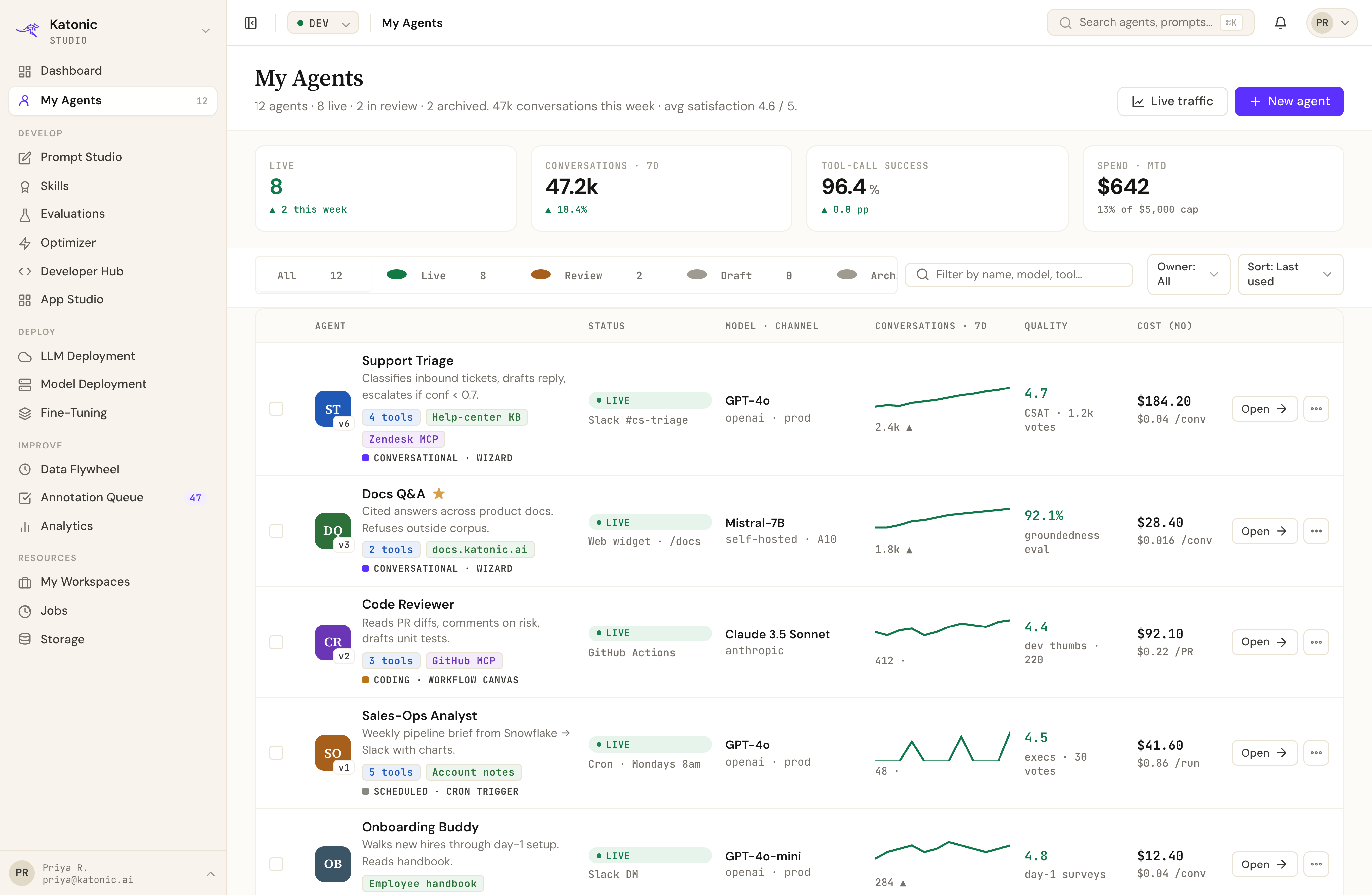
Studio is the one place developers live at /studio. Browse your agents, check live ops metrics, or jump straight into the code editor - all behind a single sidebar. Click through the screens to see what your team works in every day.
Pick the path that matches what you have. A new project that needs an AI feature, an existing agent built on a different framework, or a backend that just needs to call a model. Each path gets you running in under an hour.
Get an API key, paste a cURL command, see a streaming response. Useful for: kicking the tyres before committing to anything.
curl -N "$KAT_URL/public/v1/chat" \
  -H "Authorization: Bearer $KAT_KEY" \
  -d '{"agent_id": "demo"}'
Try a hello world →You already have an agent built on LangGraph, CrewAI, or your own Python. Upload it, the platform detects the framework, scaffolds the wrapper, and publishes it.
katonic agents upload ./my-agent \
  --detect --wire-knowledge \
  --publish=test
Bring your agent →
Open the agent builder, pick a path. Guided wizard for declarative configs, workflow canvas for multi-step logic, IDE with SDK for code-first builds.
# Or do it from CLI:
katonic agents new \
  --template=hr-assistant \
  --workflow-canvas
Build from scratch →
The same chat call rendered four ways: cURL for trying it from a terminal, Python with the typed SDK, Node for backend integration, and MCP for connecting from Claude Desktop. Each one ends up at the same agent, with the same governance, in the same audit log.
curl -N $KAT_URL/public/v1/chat \
  -H "Authorization: Bearer $KAT_KEY" \
  -d '{
     "agent_id": "hr-assistant",
     "messages": [{
       "role": "user",
       "content": "Hi"
     }],
     "stream": true
   }'
USE WHEN
· quick smoke test
· no SDK in your stack
· script in any shell
from katonic import Katonic

client = Katonic()

stream = client.chat.create(
  agent_id="hr-assistant",
  messages=[{
    "role": "user",
    "content": "Hi"
  }],
  stream=True
)
for event in stream:
  print(event)
USE WHEN
· data / ML stack
· typed clients matter
· async-first apps
import { Katonic } from
  "@katonic/sdk";

const k = new Katonic();

const stream =
  await k.chat.create({
    agent_id: "hr-assistant",
    messages: [{
      role: "user",
      content: "Hi"
    }],
    stream: true
  });

for await (const ev of stream)
  console.log(ev);
USE WHEN
· web backend
· serverless functions
· streaming UIs
# claude_desktop_config.json
{
  "mcpServers": {
    "katonic": {
      "url": "https://
        mcp.your-org
        .katonic.ai",
      "key":
        "$KAT_MCP_KEY"
    }
  }
}
USE WHEN
· call from Claude Desktop
· call from ChatGPT GPTs
· call from any MCP client
Every common pattern has a template. Every common framework has a starter kit. Every common task has a tutorial. The spec is downloadable so you can generate clients we don't ship.
Most enterprise AI platforms make developers choose: either move all your work into our environment, or accept a third-rate API. Both options are bad. The platform is supposed to make you faster, not slower. Six surfaces over the same services means a developer can pick by intent - script with the SDK, integrate via REST, expose via MCP, fine-tune via the wizard - and never have two implementations of the same business logic.
Sandbox access in 24 hours. Comes with API keys for REST and MCP, the SDK installed in a sample notebook, a working agent, and access to the agent builder. Start with whichever surface fits the task you have right now.
Switch surfaces as the task changes. They all hit the same platform.